Cloudflare WAF in the Wild: Navigating Partial DNS Challenges
Common pitfalls of deploying Cloudflare with Partial (CNAME) at scale.
Rahul Dhawan is a senior security engineer with 6 years of experience securing distributed systems, building internal security platforms, and leading initiatives across WAF, data security, logging, and detection. He writes technical breakdowns grounded in real-world deployments, with an eye for architecture, automation, and reliability under pressure.
When integrating Cloudflare’s Web Application Firewall (WAF) into mature, production-grade infrastructure—not a simple hello-world setup—the internet offers little guidance.
This post is for architects and engineers deploying Cloudflare at scale, ensuring reliability without sleepless nights over DNS propagation or silent outages.
We focus on the Partial (CNAME) setup, where Cloudflare acts as a reverse proxy but not the primary DNS provider. From origin exposure risks to apex domain limitations and certificate management, we’ll cover the pitfalls that can break your deployment if overlooked. These are real-world challenges, not theory, drawn from deploying Cloudflare in environments not originally designed for edge proxies.
Infrastructure challenges like DNS strategy, apex domain routing, and origin security are universal. Every engineer integrating Cloudflare or any edge WAF into critical systems will face them!
What This Blog Covers
Partial DNS Setup and Pitfalls: Why it seems simple but bites in production, including:
Manual subdomain management overhead
Wildcard subdomain migration issues
Loss of advanced DNS routing features
Inability to use Cloudflare Workers’ custom domains
Limited DNS-level security
Origin Exposure Risks: How attackers bypass Cloudflare to hit your origin
Multi-Level Subdomain Trap: Hidden risks of deep subdomains
Subdomain Zone Collisions with Existing DNS Records (When Zone Holds Are Disabled)
Bonus: Bandwidth Optimisation & Cost Savings: Real-world architecture and savings 💸
Partial DNS Setup

Cloudflare’s Full DNS setup positions it as the primary DNS provider for your domains, offering fast resolution and seamless integration with its CDN and security features. However, high-profile outages, like the 2020 incident that disrupted proxy and WAF services, have caused downtime for customer websites, raising concerns about relying on Cloudflare as a single point of failure. Additionally, vendor lock-in can be a risk, as Cloudflare’s proprietary features (e.g., custom WAF rules or Worker dependency) are hard to migrate, and switching DNS providers during an outage is delayed by DNS propagation, which can keep sites offline for hours or days.
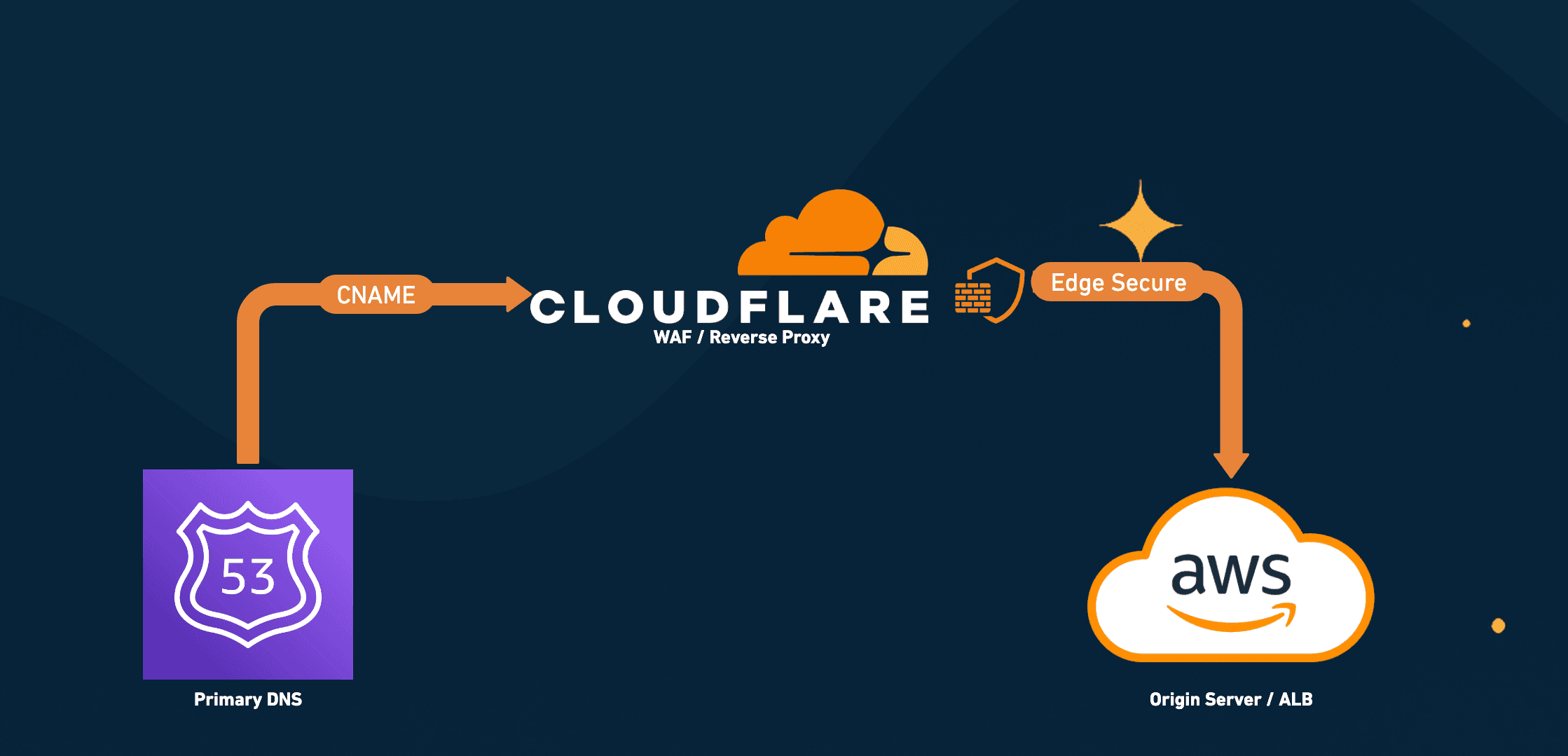
To address these risks, many organisations opt for a Partial (CNAME) setup, where a provider like AWS Route 53, Google Cloud DNS, or Azure DNS remains the primary DNS authority, and Cloudflare is used as a reverse proxy via CNAME records (which redirect specific subdomains to Cloudflare). This hybrid approach leverages Cloudflare’s edge capabilities, such as caching, Advanced WAF protections like Bot mitigations and DDoS protection, while retaining DNS control with a provider known for reliability and integration with infrastructure. However, managing two providers adds operational complexity, and CNAME chaining can introduce subtle issues that are hard to anticipate, and that’s exactly what we’ll unpack in the sections ahead.
Hidden Trade-offs of Partial (CNAME) Setup
⚠️ Manual Subdomain Management Overhead
Pitfall: In Partial (CNAME) setup, Cloudflare does not control the primary DNS zone, so each subdomain must be manually added as a CNAME in both the primary DNS provider (e.g., Route 53) and Cloudflare for proxying to work.
In contrast, Full DNS setup (where Cloudflare is the primary DNS provider) allows auto-discovery and easier wildcard handling, letting you configure rules or protections more holistically across your zone.
Consequence:
For zones with 100+ subdomains, manual configuration is time-consuming.
New subdomains require dual updates, increasing the risk of missing records and breaking HTTPS or WAF protections.
Wildcard delegation (e.g., *.example.com) doesn’t automatically cover new subdomains in Cloudflare.
Solution:
Automate DNS updates using Infrastructure-as-Code (e.g., Terraform, AWS Lambda) to sync primary DNS (eg. Route 53) and Cloudflare DNS.
For non-critical zones, consider Full DNS or subdomain delegation
⚠️ Wildcard Subdomain Migrations issues
Pitfall: Not all DNS clients respect CNAMEs pointing to * (wildcards).
Migrating wildcard subdomains (e.g., *.a.b.example.com) to Cloudflare via CNAME can fail with some DNS clients, like c-ares (used by Node.js), which don’t resolve wildcard CNAMEs correctly, causing silent resolution errors.
Why it breaks
A record like *.a.b.example.com CNAME *.a.b.example.com.cdn.cloudflare.net may resolve in dig but fail in applications, as the wildcard is treated literally.
Solution
Ensure that no conflicting record for
wildcard.a.b.example.comexists inside Cloudflare.Use an intermediary wildcard record:
# Route 53 record proxies * subdomans to 'wildcard' subdomain on CF
*.a.b.example.com CNAME wildcard.a.b.example.com.cdn.cloudflare.net

## On Cloudflare DNS, wildcard traffic is further proxied to origin
wildcard.a.b.example.com CNAME <origin>
This ensures consistent resolution across clients, avoiding production outages.
⚠️ Apex Domains Can't Be Proxied Directly via CNAME
Pitfall: In a Partial (CNAME) DNS setup, you cannot proxy apex (root) domains like example.com through Cloudflare.
Why it break:
The DNS protocol prohibits creating a CNAME record at the zone apex (e.g., example.com) because it would conflict with other essential DNS records like NS, SOA, MX, and TXT. While some DNS providers offer solutions like CNAME flattening or ALIAS records to circumvent this limitation, AWS Route 53's ALIAS records are designed to route within AWS services and don't provide a generic solution for external services like Cloudflare. Refer
Consequences:
Without a way to proxy the apex domain through Cloudflare in a Partial setup, you lose access to Cloudflare's security features (like WAF and DDoS protection) and performance enhancements for your root domain unless you use a workaround.
Solutions:
Option 1: Utilise Cloudflare's Static IPs for Apex Domains
Cloudflare can allocate static IP addresses to your zone, enabling you to create A records at the apex domain that point directly to Cloudflare's infrastructure. This approach allows you to maintain your current DNS provider while still benefiting from Cloudflare's services for the apex domain.- Note that this feature is typically available only on Cloudflare’s Enterprise plans and may involve additional costs.
Option 2: Use Cloudflare as the Primary DNS Provider
By transferring your DNS management to Cloudflare, you can leverage their CNAME flattening feature, which allows you to proxy apex domains by returning A or AAAA records instead of CNAMEs at the root level.Option 3: Redirect Apex to a Subdomain
Implement a redirect from the apex domain to a subdomain (e.g.,www.example.com) that is proxied through Cloudflare. This can be achieved using your web server, load balancer, or a service like AWS S3 with static website hosting. reddit.com
Caveats:
Redirecting the apex domain introduces additional dependencies. For instance, if the redirect mechanism (like an AWS ALB or S3 bucket) experiences downtime, users may not reach your site, and Cloudflare's protection won't be effective since traffic doesn't pass through their network.
⚠️ Loss of Advanced DNS Routing Features
Pitfall: Route 53’s Weighted Routing Policy enables native blue-green deployments by splitting traffic across different environments directly at the DNS level. But when you introduce Cloudflare in a Partial CNAME Setup, that entire capability goes out the window.
Why It Breaks:
A CNAME record is required to proxy traffic to Cloudflare, but per DNS RFCs, a CNAME can’t coexist with other records. Since Route 53's native weighted policies require knowing how to split the traffic between the endpoints, these restrictions mean you can't leverage Route 53’s native weighted policies.
Consequences:
No DNS-level A/B testing or traffic splitting.
Testing Cloudflare with partial traffic (e.g., 20% to Cloudflare, 80% to legacy) is impossible.
Solution:
Option 1: Cloudflare Load Balancer
Use Cloudflare Load Balancer to distribute traffic across multiple origins. This supports weighted splits, session affinity, and health checks but comes at a cost, both financially and in terms of Cloudflare lock-in.Option 2: Cloudflare Workers
Write a Worker script that inspects requests and routes traffic to different origins. This is cheaper and flexible but requires coding effort and doesn’t come with enterprise support.Option 3: Do It Inside AWS
Stick to AWS’s Elastic Load Balancers (ELB) for A/B testing. It’s free if you’re fully on AWS, but not helpful if your infra spans multiple cloud providers.
Trade-off: DNS-level routing is lost unless you invest in Cloudflare’s premium features or custom logic.
⚠️ Custom Domains for Cloudflare Workers May Not Work
Pitfall: Custom domains on Cloudflare Workers often fail in Partial DNS setups, since Cloudflare attempts to auto-create DNS records and provision SSL certificates within its own DNS, but cannot do so on external providers like AWS Route 53 or Azure DNS.
Why does it break:
When using Cloudflare’s “Map Custom Domain” feature under a Partial (CNAME) setup, SSL certificate provisioning can fail silently. Since Cloudflare isn’t the authoritative DNS provider, it cannot automatically create the required DNS records or complete certificate issuance — leading to broken or incomplete TLS setups. The catch? The SSL handshake might succeed in Safari but fail in Chrome, causing subtle, environment-specific outages that are hard to debug.
In modern browsers like Chrome, this can trigger Encrypted Client Hello (ECH) handshake failures because the expected certificate isn’t found at the edge.
Consequences:
WebSocket connections may fail silently, with no errors in the browser console.
Incomplete or incorrect SSL provisioning can trigger environment-specific outages, breaking critical user flows for only a subset of users.
In Chrome/Arc, you'll encounter the following error, but the same connection may work fine in Safari, making it harder to detect:
handshake failed; returned -1, SSL error code 1, net_error -183
Why did it work on Safari but not on Chrome?
net::ERR_SSL_PROTOCOL_ERROR (net_error -183). Safari, which has only experimental ECH support as of 2025, uses traditional SNI-based TLS. Cloudflare likely served a fallback wildcard certificate for the zone, which Safari accepted, allowing the connection to succeed. Read more about it → https://blog.cloudflare.com/encrypted-client-hello/Solution:
Instead of relying on “Map Custom Domain”, do the following instead:
Create the subdomain mapping in the primary DNS provider (e.g., Route 53) pointing to Cloudflare. For example:
sub.example.com CNAME sub.example.com.cdn.cloudflare.netCreate a matching DNS record in Cloudflare DNS to route traffic to the Worker. For example:
sub.example.com CNAME my-worker.workers.devEnsure Cloudflare uses the existing wildcard certificate for the zone, preferably an Advanced Certificate, to avoid ECH handshake issues.
In the Cloudflare Workers dashboard, under "Domain and Routes," manually add a URL pattern (e.g., sub.example.com/*) to route traffic to your Worker instead of using the "Custom Domain" option.
⚠️ Limited DNS-Level Security Capabilities
Pitfall: Cloudflare’s DNS-layer protections (e.g., DNS DDoS mitigation, DNSSEC) are unavailable in Partial DNS setups, as the primary DNS provider (e.g., Route 53) handles queries.
Why it breaks:
In a Partial (CNAME) Setup, AWS Route 53 remains the primary DNS. This means Cloudflare’s advanced DNS-layer protections like DNS-based DDoS mitigation and DNSSEC are not fully applicable.
For DDoS: CF’s DNS-layer DDoS protection won’t shield your zone, since DNS queries still resolve via Route 53.
For DNSSEC: Deploying DNSSEC becomes tricky. You’ll need to configure DNSSEC on your primary DNS provider (e.g., Route 53) — not on Cloudflare. This creates added complexity if your security team expects DNSSEC to be part of the Cloudflare stack.
Consequence:
Organizations lose the ability to centralize DNS-layer security within Cloudflare. DNS-level attacks like cache poisoning or zone hijacking must be mitigated separately at the primary DNS layer. Additionally, since Route 53 does not support custom DNSSEC workflows like multi-signer setups, implementation becomes more challenging, often requiring alternative DNS providers or manual key management.
Solution:
Stick with Route 53 only if you trust its DDoS protections (and AWS Shield integration).
If DNSSEC is non-negotiable, ensure you configure and validate it entirely on Route 53.
Or, consider migrating to Full DNS setup on Cloudflare to consolidate DNS-layer protection and simplify security operations.
⚠️ Multi-Level Subdomain Trap
Pitfall: Cloudflare’s Universal SSL may fail to provision certificates for multi-level subdomains (e.g., a.b.c.example.com), as wildcard certificates (e.g., *.example.com) only cover one level (RFC 2818). This causes HTTPS outages during proxy enablement.
What makes it worse?
Wildcard certs like *.example.com only cover one level. So if you’re onboarding a subdomain like a.b.c.example.com, it won’t be covered unless it's explicitly added as a SAN in your certificate. In this scenario, downtime is inevitable.
Why Wildcard Certs Don’t Cover Multi-Level Subdomains
.example.com matches foo.example.com but does not match bar.foo.example.com.”Consequence:
A Universal cert might not be ready in time
A wildcard cert might not even work for a multi-level subdomain
And suddenly, you’re in the middle of a silent outage
Solution:
- Purchase an Advanced Certificate and list multi-level subdomains in the SANs to ensure coverage. This ensures SSL Manager has a fallback if auto-provisioning fails, and avoids last-minute surprises during production rollouts.
⚠️ Origin Exposure Risks
Pitfall: In a Partial DNS setup, the risk of attackers bypassing Cloudflare to target your origin server (e.g., AWS ALB) directly is heightened because Cloudflare doesn’t control the DNS zone, making it harder to enforce DNS-layer protections that could obscure origin details.
Overview
One of the most overlooked risks in WAF deployments, especially in Partial DNS setups, is failing to restrict origin access to only Cloudflare IPs.
Without this, anyone who knows (or discovers) your origin IP can bypass Cloudflare altogether, hitting your backend directly with malicious traffic or even launching DDoS attacks and Cloudflare won’t even see it.
❗Discovering the origin ALB behind Cloudflare
Let’s say a domain like app.example.com is behind Cloudflare using Partial DNS setup (e.g., a CNAME to an AWS ALB). In a properly secured setup:
The ALB hostname/IP should never be publicly exposed.
The edge certificate should only include the public domain, not the origin.
However, attackers can still try to discover the origin using public certificate logs like (crt.sh, shodan, censys.io, etc)
# Step 1: Search for legacy certificates with leaked SANs/CNs
https://crt.sh/?q=%25example.com
In some cases, especially with legacy or misconfigured setups, the certificate might contain an entry like: *.elb.amazonaws.com or even internal-app-alb-1234567890.us-east-1.elb.amazonaws.com
Why it breaks:
Even though newly issued Cloudflare-managed edge certificates won’t expose origin info, older or cached certificates, or certs misissued before migrating to Cloudflare, might still surface in CT logs — and the ALB hostname or IP may still be valid if:
The DNS still maps the domain to the same origin
No IP restriction or mTLS is enforced at the ALB
curl -i -s -k -X $'GET' \
    -H $'Host: app.example.com' -H $'Content-Length: 0' \
    $'https://Service_ALB_Name.elb.amazonaws.com/'
Solution
Authenticated Origin Pulls (mTLS between Cloudflare and your origin). This ensures only CF reverse proxies can talk to your infrastructure.
Aegis IP: Configure CF to send all traffic from dedicated IPs. Might cost your org arms and legs 😅
The solution sounds simple, but if you miss it, Cloudflare’s protections can be quietly bypassed. 😉
⚠️ Zone and Record Name Collisions in Cloudflare
Pitfall: In the past, creating a new Cloudflare zone for a subdomain (e.g., sub.example.com) could cause a collision with an existing DNS record in a parent zone (e.g., example.com), leading to resolution failures. While Cloudflare now mitigates this with Zone Holds (enabled by default for new zones), the risk reemerges if you disable this feature.
Why It Breaks:
In a Partial setup, subdomains are proxied to Cloudflare via CNAME records (e.g., sub.example.com CNAME sub.example.com.cdn.cloudflare.net) managed by the primary DNS provider (e.g., Route 53). Historically, if a new Cloudflare zone was created for sub.example.com. Perhaps to isolate traffic for cost optimisation or to enable features like Bot Management, Cloudflare’s resolution logic would conflict with the existing CNAME in the parent zone. This happened because Cloudflare lacked guardrails to prevent overlapping zones, causing the CNAME to stop resolving (e.g., returning DNS_PROBE_FINISHED_NXDOMAIN).
Cloudflare has since introduced Zone Holds, which prevent the creation of a new zone for a subdomain that’s already active in another account. Zone Holds are enabled by default for newly created zones, significantly reducing this risk. However, if you disable Zone Holds (e.g., to allow another team to manage sub.example.com in a separate account), the same collision can occur, breaking resolution for that subdomain.
Consequences:
The affected subdomain becomes unreachable, causing production outages for services hosted on that subdomain (e.g., login endpoints, APIs).
Traffic may be routed to the new zone, which might not be configured to handle requests, resulting in HTTP 530 errors or other failures.
The issue can be hard to diagnose, especially in a Partial DNS setup where DNS management is split between providers, requiring careful review of zone configurations.
Solution:
- Keep Zone Holds enabled: to prevent collisions, and audit DNS records before creating new zones if Zone Holds are disabled.
Bonus: Bandwidth Optimisation with Cloudflare
Why it matters:
When used smartly, Cloudflare isn’t just a security layer, it’s also a cost optimisation lever. By strategically offloading bandwidth-heavy traffic from AWS CloudFront and distributing zones across Cloudflare’s Enterprise and Business plans, you can save thousands in monthly egress charges without compromising reliability or protection where it matters most.
Real-World Bandwidth Savings
One of the biggest hidden cost levers in Cloudflare’s pricing model is how bandwidth is billed across plan types:
The Enterprise plan typically comes with a pre-agreed monthly bandwidth cap (e.g., 200TB). Exceeding it incurs a per-TB charge, based on your negotiated rate.
The Business plan, on the other hand, charges a flat monthly fee (e.g., $200 per domain) and does not meter bandwidth usage. It includes essential WAF and CDN features but lacks advanced protections like Bot Management. The account is also self-served, meaning there’s no SLA and only limited support.
This makes the Business plan an attractive option for high-throughput zones — especially those serving static content, bots, or machine-to-machine traffic — where security requirements are lower but egress volume is high.
Smarter Play: Split Zones Across Enterprise and Business Plans
Rather than downgrading your entire Cloudflare contract, you can:
Detach the bandwidth-heavy zones from Enterprise and re-create them under a separate Business account.
Keep the remaining zones on Enterprise, where you still need advanced WAF, bot protection, and custom support.
This gives you the best of both worlds:
Unlimited bandwidth on the noisy zone without risking DTO overage
Continued advanced protections and SLAs on production-critical services
Cloudflare's pricing isn't just about features — it's about how you architect zones.
Offload the traffic. Split the plan. Lower the bill.
Conclusion: Partial DNS setups offer flexibility but come with trade-offs like manual management, limited routing, and security gaps. By understanding these pitfalls and implementing solutions like automation, Advanced Certificates, or Authenticated Origin Pulls, you can deploy Cloudflare effectively. Have you tackled these challenges or found other Cloudflare pitfalls? Share your experiences in the comments!